
Zenario

Login

Create account

Open search
X
  • Documentation zone
  • Developer
    • Quick-start guides
    • TUIX elements and properties
    • Methods you write
    • Core function/variable reference
    • Plugin function/variable reference
  • Designer
    • Creating a layout
    • Creating a skin
    • Structuring a new page
    • CSS on pages and layouts
    • Twig for server-side code
    • Twig for smart emails
Documentation zone Developer Quick-start guides Basic concepts of modules How to start a module


How to start a Module

Modules will not start running immediately when you put them in the zenario_custom/modules/ directory, you need to start them first.

When you place a new module in the modules/ directory, it will appear in the Modules panel in Organizer.
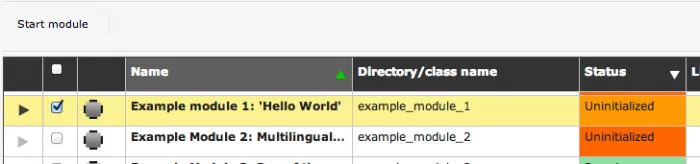
Screen Shot 2014-08-06 at 16.14.28.png

You can start the module by selecting it, and then clicking on the Start module button.


  • Quick-start guides
    • Basic concepts of modules
      • Fundamentals and naming
      • How to start a module
    • How to write a pluggable module
    • Modules with an Admin Interface
    • Modules that extend other Modules
    • Advanced concepts
    • How do I...
    • Standards and security
    • Developer Tools
  • TUIX elements and properties
  • Methods you write
  • Core function/variable reference
  • Plugin function/variable reference
 
 
Home | Sitemap | Privacy | Contact us | Manage cookies
Tribal Systems logo website design
Copyright © Tribal Ltd. 1997-2026